How do you cover a cleaning when someone calls out?
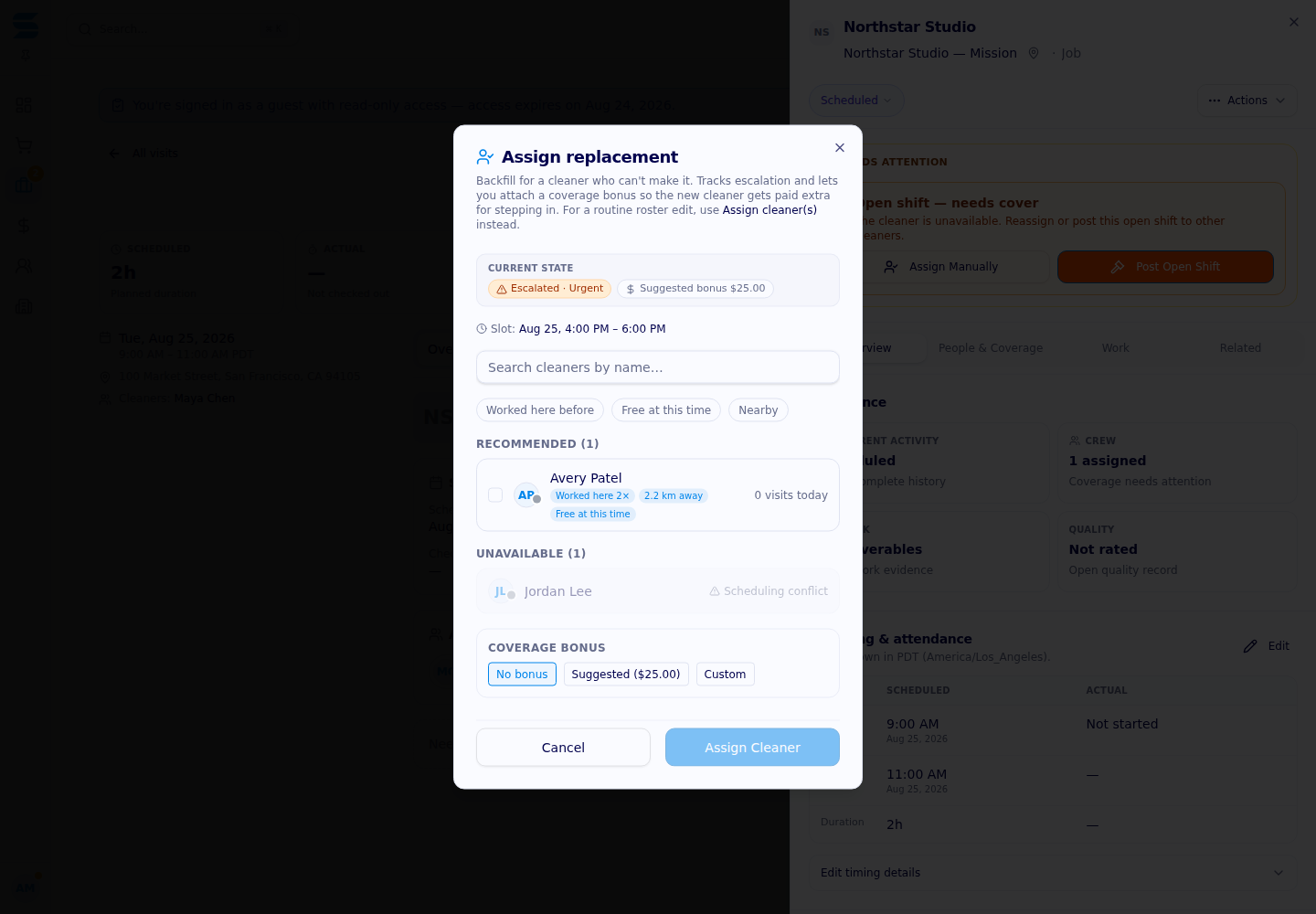
Slate keeps the scheduled visit visible when a cleaner withdraws, checks replacement candidates for eligibility and conflicts, and records whether coverage is offered, accepted, or still unfilled.
How do you cover a cleaning when someone calls out?
Slate treats a call-out as a coverage event rather than quietly deleting the visit. The cleaner’s own attendance can be withdrawn, the original visit can remain on the schedule, and a solo call-out can mark the visit as needing a replacement. Operations can then review eligible candidates, open replacement offers, and see whether someone accepts. This creates a path from “we have a staffing problem” to “the visit is covered” without telling a client that coverage is complete before it actually is.
Preserve the visit and record the call-out
When a cleaner says they cannot attend, Slate’s withdrawal workflow records the reason and notes against that cleaner’s assignment. On a shared visit, the other assigned cleaners remain attached. On a solo visit, the coverage state feeds the replacement pipeline instead of cancelling the client’s scheduled service. A cleaner who releases an open-shift claim before the visit starts can also reopen the auction in the specific pre-start conditions supported by the workflow.
That distinction protects the service record. A call-out is not the same as a client cancellation, and an individual withdrawal is not permission to erase a multi-person visit. Operations can see that the original assignment changed and work the replacement without losing the location, time slot, scope, or client context.
Search for a replacement who can actually take the slot
The replacement engine checks more than a list of names. Candidate ranking starts with active staff and filters for assignment eligibility, service type, approved availability, and handbook constraints. It checks for overlapping visits in the same time window, considers the cleaner’s service geography when property coordinates are available, and accounts for existing workload. Backup cleaners can be considered before the broader eligible pool.
The ranking is operational, not a performance verdict. Cleaner performance is intentionally not used to select a replacement automatically. The engine’s score can help organize outreach around proximity, availability, and capacity while leaving the coverage decision within the approved process.
Make an offer, then wait for an actual acceptance
When a visit needs coverage, Slate can open replacement rounds. Farther from the visit, outreach can proceed sequentially; closer to the start, the configured workflow can broadcast offers to eligible candidates. Offers have an expiry window, and the system records whether a cleaner accepted, declined, expired, or became ineligible. Operations can also send a manual offer to a selected eligible group, with a configured incentive where appropriate.

The first valid acceptance is applied transactionally. Other pending offers are cancelled, the replacement assignment is committed, the visit returns to its scheduled state, and open replacement alerts are resolved. Where client contact information and notifications are configured, Slate can send a replacement-found update. If nobody accepts, the visit remains a coverage problem and the escalation level can rise rather than being mislabeled as solved.
Give clients an honest coverage status
The important client-facing distinction is between needs replacement, offers in progress, and replacement accepted. Slate can help an operations team move quickly, but no replacement workflow guarantees a cleaner will accept, arrive, or complete the service. Candidate availability, travel, time, eligibility, and the remaining lead window still matter. A responsible update should say whether coverage is still being worked, confirmed, or requires another plan.
Build a coverage plan for your sites
Ask Slate to review your call-out rules, backup roster, replacement offer timing, escalation ownership, and client-update process for a multi-location cleaning program.











Proudly supporting

.avif)